# IntegrationButtonBlock

The purpose of this block is to enable interaction with third-party data providers through configurable parameters and caching mechanisms.

Below is a description of the available options and supported services:

## 1.1 Properties

| Property Name        | Description                                                                                                                                                                                                                   | Example           |
| -------------------- | ----------------------------------------------------------------------------------------------------------------------------------------------------------------------------------------------------------------------------- | ----------------- |
| Button name          | The display name of the button                                                                                                                                                                                                | Integration Data  |
| Enable caching       | If set to true, and the data was previously saved to the database (e.g., via the "sendToGuardian" block), future requests with the same parameters will retrieve the data from the cache instead of performing a new request. | Checked/unchecked |
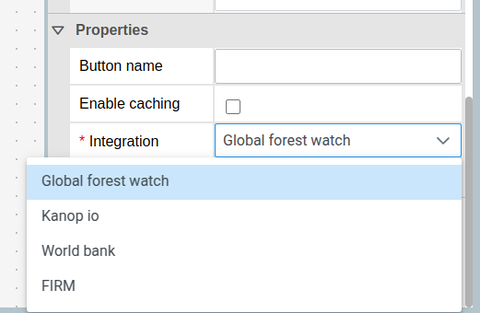
| Integration          | <p></p><p>Type of integration. Currently supported values:</p><ul><li>GLOBAL\_FOREST\_WATCH</li><li>KANOP\_IO</li><li>WORLD\_BANK</li><li>FIRM</li></ul>                                                                      | KANOP\_IO         |
| hideWhenDiscontinued | Check if the button should be hidden when policy is discontinued                                                                                                                                                              | Checked/Unchecked |
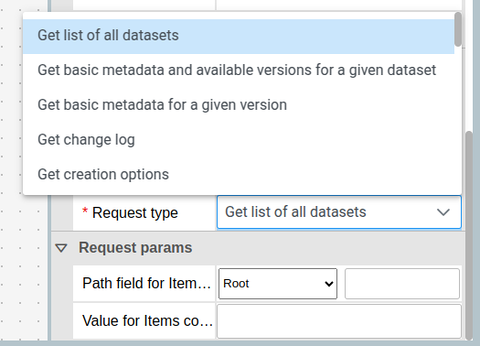
| Request type         | The name of the specific request to execute (varies per integration).                                                                                                                                                         | getDatasets       |
| Request params       | Parameters required for the selected request. These are integration-specific.                                                                                                                                                 | datasets          |

<figure><img src="https://3006114282-files.gitbook.io/~/files/v0/b/gitbook-x-prod.appspot.com/o/spaces%2FXVOaWpJKxLZf1Tee9eCO%2Fuploads%2FLgFuOVLVyWyktXBUwBVu%2Fimage.png?alt=media&#x26;token=a1f9a259-9de3-404c-9738-b8454b21adfd" alt=""><figcaption></figcaption></figure>

## 1.2 Output Events <a href="#id-1.2-output-events" id="id-1.2-output-events"></a>

This block can emits the following events:

* RunEvent
* ReleaseEvent
* RefreshEvent

<figure><img src="https://3006114282-files.gitbook.io/~/files/v0/b/gitbook-x-prod.appspot.com/o/spaces%2FXVOaWpJKxLZf1Tee9eCO%2Fuploads%2FaYUsAvX57VfPArfChQQs%2Fimage.png?alt=media&#x26;token=48dc3fd3-ed5f-4399-b257-ac03358e95df" alt=""><figcaption></figcaption></figure>

To enable caching functionality, data must be saved to the database using the "sendToGuardian" block with the source set to auto or database. You can link the IntegrationButton to the "sendToGuardian" block using the RunEvent output event.

<figure><img src="https://3006114282-files.gitbook.io/~/files/v0/b/gitbook-x-prod.appspot.com/o/spaces%2FXVOaWpJKxLZf1Tee9eCO%2Fuploads%2FND581LSF7xbx0g6BOpEO%2Fimage.png?alt=media&#x26;token=bb63074c-572e-4ec9-b9aa-a7d7b506aef5" alt=""><figcaption></figcaption></figure>

## 1.3 Supported Integrations <a href="#id-1.3-supported-integrations" id="id-1.3-supported-integrations"></a>

This block supports four third-party data providers:

1\. [Global Forest Watch](https://data-api.globalforestwatch.org/)

2\. [Kanop](https://www.kanop.io/)

3\. [World Bank Governance Indicators](https://databank.worldbank.org/source/worldwide-governance-indicators)

4\. [NASA FIRMS](https://firms.modaps.eosdis.nasa.gov/)

<figure><img src="https://3006114282-files.gitbook.io/~/files/v0/b/gitbook-x-prod.appspot.com/o/spaces%2FXVOaWpJKxLZf1Tee9eCO%2Fuploads%2FXsIyplu183WX3hfFFagD%2Fimage.png?alt=media&#x26;token=52bd3b9d-e228-4983-8a08-5453736d2784" alt=""><figcaption></figcaption></figure>

## 1.4 Request UI Parameters <a href="#id-1.4-request-ui-parameters" id="id-1.4-request-ui-parameters"></a>

Each integration has a list of supported requests and associated parameters. For each request parameter, two input methods are available:

| Parameter          | Description                                                   |
| ------------------ | ------------------------------------------------------------- |
| Path field for ... | A Path input to extract data from an existing field.          |
| Value for ...      | A manual input for static values (e.g., known dataset names). |

{% hint style="info" %}
**Note: If both fields are filled, "Value for ..." takes precedence.**
{% endhint %}

<figure><img src="https://3006114282-files.gitbook.io/~/files/v0/b/gitbook-x-prod.appspot.com/o/spaces%2FXVOaWpJKxLZf1Tee9eCO%2Fuploads%2FmMN9JCFslt55YMX3Kzpo%2Fimage.png?alt=media&#x26;token=2cf76b44-d12a-481d-bbf3-60a5ff2fe784" alt=""><figcaption></figcaption></figure>