# Request Vc Document Block Addon (requestVcDocumentBlockAddon)
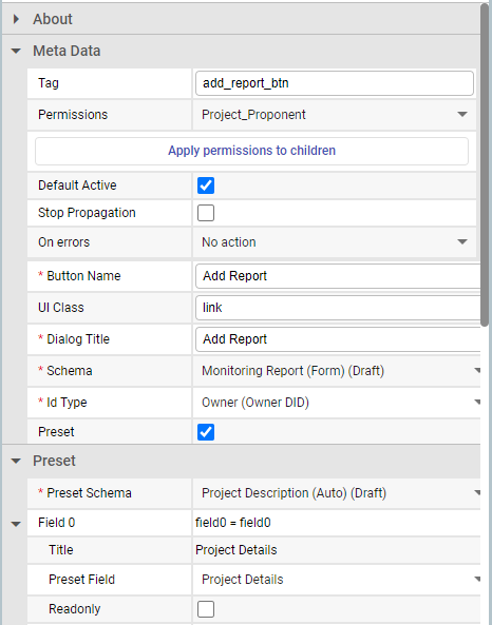
The purpose of this block is to display an interactive button in the interfaceDocumentsSourceBlock.
## Usage
As shown in the example below, requestVcDocumentBlockAddon blocks should be placed inside interfaceDocumentsSourceBlock blocks.
## Properties
| Property Name | Description | Example | Status |
| ------------------------------ | ---------------------------------------------------------------- | -------------------------------------------------------------------------------------------------------------------------------------------- | ------ |
| Button Name (*buttonName*) | The label (name) of the button as displayed to the user. | Add report | |
| UI Class (*uiClass*) | The UI class of the button. | "btn-approve”, “btn-reject”, “btn-link | |
| hideWhenDiscotinued | Check if the button should be hidden when policy is discontinued | Checked/Unchecked | |
| Dialog Title (*dialogTitle*) | The title of the dialog. | Add report | |
| Schema (*schema*) | Schema which will be used for document creation. | #de62118a-d746-4c9f-ba1a-2278b13a2137 | |
| Id Type (*idTypev)* | Type of identifier in document which will be created. | “UUID”, “DID”, “OWNER” | |
| Preset (*preset*) | Will selected document be used as preset. | true, false | |
| Preset Schema (*presetSchema*) | Schema which will be used as a preset schema. | #de62118a-d746-4c9f-ba1a-2278b13a2137 | |
| Preset Fields (*presetFields*) | Preset fields configuration. |
\[
{
"name": "field0",
"title": "Project Details",
"value": "field0",
"readonly": false
}
]
| |
## Events
Request VC document block addon events will be automatically added to document source.
## API
The API for the dropdownBlockAddon has both GET and POST methods:
1\. Example response to the GET request:
```
{
"id": "20639b5d-c43d-4aa0-a1d1-d0ac36e867de",
"blockType": "requestVcDocumentBlockAddon",
"buttonName": "Add Report",
"uiClass": "link",
"dialogTitle": "Add Report",
"presetFields": [
{
"name": "field0",
"title": "Project Details",
"value": "field0",
"readonly": false
},
...
],
"schema": {
...
},
"idType": "UUID",
"preset": true,
"presetSchema": "#de62118a-d746-4c9f-ba1a-2278b13a2137",
}
```
A response to the GET request includes all block settings and:
* schema - Schema document
2. Example payload for the POST request:
```
"document": {
"field0": "Device",
"field1": "Organization",
...
},
"ref": "66ba0cad0edaef237a78b44b"
}
```
* document - Credential subject
* ref - Reference document identifier